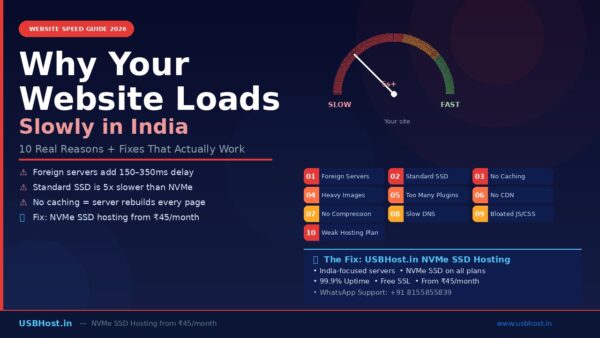
Is Your Website Loads Slowly in India? Discover the main reasons behind poor website speed and learn simple, effective ways to improve performance, boost SEO rankings, and deliver a faster user experience for Indian visitors.
You have built a beautiful website. The design is sharp, the content is well-written, and the product or service you offer is genuinely valuable. But when a potential customer clicks your link they wait. And wait. And then they leave.
This is the silent killer of Indian businesses online in 2026. A slow-loading website does not just frustrate visitors it actively drives them away before they even see what you have to offer. And the problem is far more common in India than most website owners realise.
The good news? Most website speed problems have a clear, fixable cause. In this guide, we will walk you through exactly why Indian websites load slowly, what each cause means for your business, and most importantly how to fix every single one of them.
Table of Contents
The Cost of a Slow Website By the Numbers
Before we dive into the causes, consider what slow loading is actually costing you every single day:
| Stat | What It Means for Your Indian Website |
| 3 seconds | Average time before a user abandons a slow-loading website before reading a single word |
| 53% | Mobile users who leave a page that takes more than 3 seconds to load on their phone |
| 2 seconds | Industry benchmark load time what every Indian business website should target |
| 10% | Users a website loses for every additional second of load time (BBC case study) |
| Page Speed | Google uses load speed as a direct ranking signal slow sites rank lower on Google India |
These are not abstract statistics. If your website takes 4 seconds to load instead of 2, you are likely losing half your potential customers before they even read a single word about your business. For an Indian ecommerce store, a local service business, or a blogger monetising content, this directly translates to lost revenue every single day.
Key Fact: Google uses page speed as a direct ranking factor for both desktop and mobile search. A faster website does not just keep visitors it brings more of them from Google in the first place.
Why Slow Loading is a Bigger Problem in India Than You Think

India presents a unique and challenging environment for website performance that most global hosting guides completely overlook. Understanding these India-specific factors is the first step toward genuinely fixing your website speed.
India is a Mobile-First Nation
More than 70% of Indian internet users browse on mobile devices primarily on 4G networks. Unlike a fibre broadband connection in a major city, mobile connections are variable. They fluctuate based on location, network congestion, and time of day. A website that loads acceptably on a desktop broadband connection in Mumbai can feel painfully slow on a 4G phone in a smaller town or on a congested network during peak hours.
This means your website must be optimised not just for speed in general, but for performance on mid-range Android devices with average mobile connectivity which represents the majority of your actual Indian audience.
Server Distance is a Hidden Speed Killer

Here is something many Indian website owners do not know: if your website is hosted on a server in the United States or Europe, every single request your visitor’s browser makes loading an image, fetching a stylesheet, running a script must physically travel thousands of kilometres across undersea cables and back again.
A server based in the US adds 150 to 250 milliseconds of latency per request. A European server adds 200 to 350 milliseconds. Your website makes dozens of these requests every time a page loads. These delays stack up rapidly turning what should be a 1.5-second load time into a 4 or 5-second crawl for your Indian visitors.
This is why choosing an India-focused hosting provider is not just a preference it is a direct performance decision that affects every visitor to your website every single day.
Server Location Reality: USBHost.in is built specifically for Indian websites, with infrastructure optimised to serve Indian visitors at the lowest possible latency. This single factor can shave 1–2 full seconds off your page load time.
10 Reasons Your Website is Slow in India And the Fix for Each
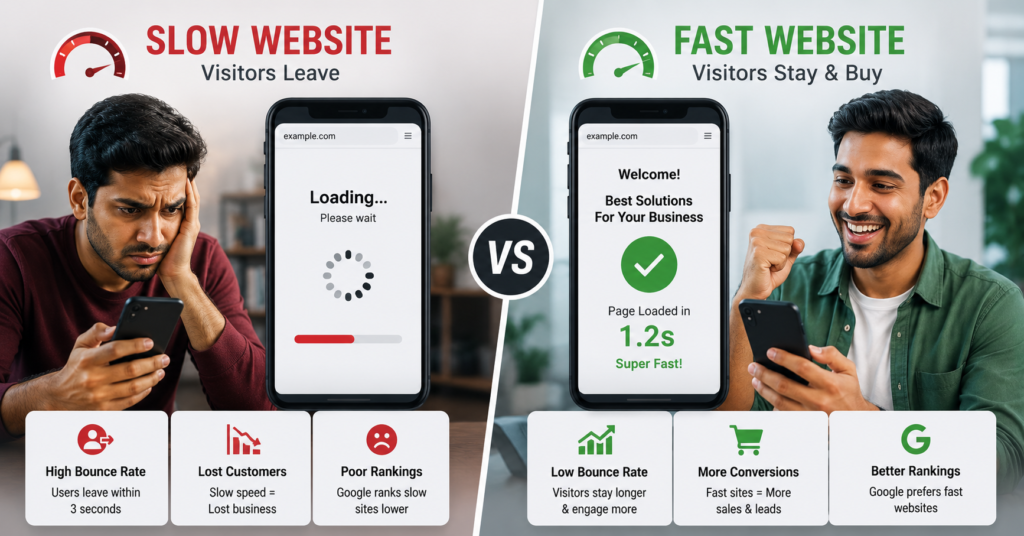
Here is a complete breakdown of every major cause of slow website loading in India, along with the specific action you need to take to fix it:
| # | Root Cause | Why It Slows Your Site | The Fix |
| 1 | Hosting on Foreign Servers | Data travels 150–350 ms extra from US/Europe | Choose India-focused hosting — USBHost.in |
| 2 | Standard SSD vs NVMe SSD | SSD is 3-5x slower than NVMe at data read | Switch to NVMe SSD hosting |
| 3 | Overloaded Shared Server | Too many sites competing for same resources | Choose quality hosting or upgrade to VPS |
| 4 | Unoptimised Images | Images over 1 MB dramatically slow pages | Compress images, use JPEG/WebP format |
| 5 | No Caching Enabled | Server rebuilds page fresh on every visit | Enable page caching plugin (e.g. WP Rocket) |
| 6 | Too Many Plugins | Each plugin adds HTTP requests & scripts | Audit plugins, keep only essential ones |
| 7 | No CDN | Static files load from one distant server | Use Cloudflare free CDN |
| 8 | Heavy JavaScript/CSS | Unminified code blocks page rendering | Minify JS & CSS files |
| 9 | No GZIP Compression | Large file sizes sent to browser uncompressed | Enable GZIP/Brotli on server |
| 10 | Slow DNS Resolution | Resolving domain name adds delay before load | Use fast DNS Cloudflare DNS |
A Closer Look at the Most Important Causes
1. Your Hosting Provider is the Root of the Problem
This is the single most important factor affecting your website speed and it is the one most Indian website owners ignore. Your hosting provider is the foundation on which everything else sits. If the foundation is weak, no amount of image compression or caching plugins will truly fix your speed problem.
The two biggest hosting-related causes of slow Indian websites are: hosting on servers located outside India, and hosting on old SSD or HDD storage rather than modern NVMe SSD.
NVMe (Non-Volatile Memory Express) is the latest generation of server storage technology. It is significantly faster than standard SSD at reading and writing data meaning your web pages are assembled and sent to your visitor’s browser far more quickly. Many budget hosting providers in India still use older SSD or HDD storage. USBHost.in uses NVMe SSD across all plans from the entry-level ₹45/month Starter plan upwards ensuring every website hosted with us benefits from the fastest available storage technology.
The Fix: Switch to NVMe SSD hosting from an India-focused provider. USBHost.in plans start at ₹45/month and include NVMe SSD, 99.9% uptime, and free SSL. Visit www.usbhost.in to get started.
2. Unoptimised Images Are Silently Slowing You Down
Images are the single largest contributor to page weight on most Indian websites. A typical homepage contains multiple images a hero banner, product photos, team photos, blog thumbnails and if each of these is uploaded at full resolution without compression, the total page size can easily exceed 5–10 MB.
Your visitor’s browser must download every byte of that page before it can display it. On a variable 4G connection, downloading 8 MB of uncompressed images can take 5–8 seconds alone. The industry standard is to keep individual images under 1 MB and total page weight under 3 MB for a good experience on Indian mobile connections.
Always compress images before uploading. Use JPEG format for photographs and WebP for modern browsers. If you are on WordPress, a free plugin like Smush or ShortPixel will automatically compress and optimise every image you upload cutting image sizes by 60–80% with no visible quality loss.
No Caching Your Server is Working Too Hard
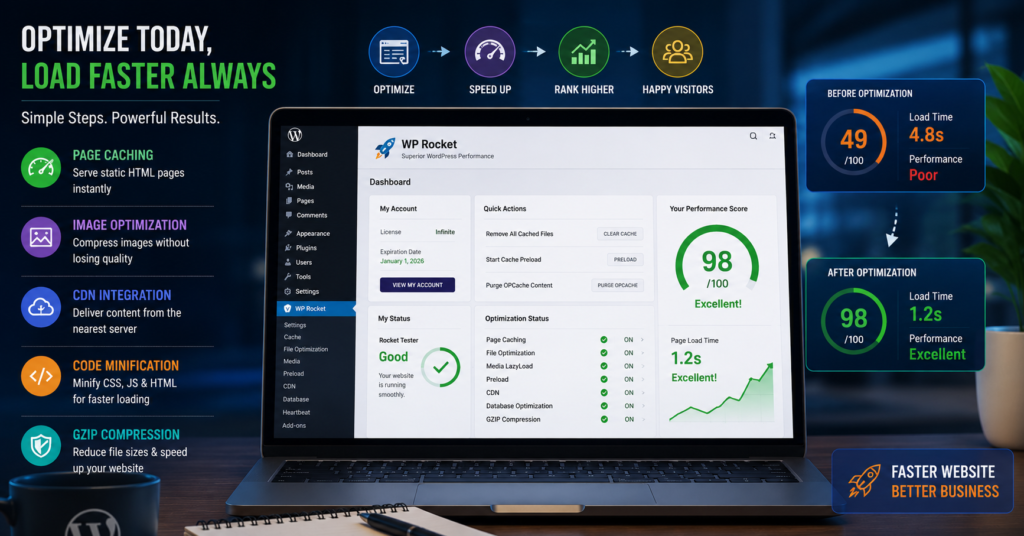
Every time a visitor lands on your website, your server has to do work: it retrieves data from the database, runs PHP code, assembles the HTML, and sends the result to the visitor’s browser. Without caching, this entire process repeats for every single visitor on every single page load.
Caching stores a ready-made version of your pages and serves it directly without repeating all that processing. The result is dramatically faster load times often reducing server response time by 80% or more. If you are on WordPress, install WP Rocket, W3 Total Cache, or the free LiteSpeed Cache plugin. If your hosting provider supports server-side caching at the infrastructure level, even better USBHost.in’s cPanel environment fully supports these caching configurations.
4. Too Many Plugins on WordPress
WordPress is the most popular website platform in India, and its plugin ecosystem is one of its greatest strengths. But it is also one of the most common sources of speed problems. Every active plugin on your WordPress site adds scripts, stylesheets, and database queries that your server must process on every page load.
A website with 40 plugins is not twice as slow as one with 20 it can be four or five times slower, because some plugins fire multiple requests each. Audit your plugins ruthlessly. Deactivate and delete any plugin you are not actively using. Replace multiple single-purpose plugins with one well-coded multipurpose solution where possible.
5. No CDN Your Static Files Are Loading from One Place
A Content Delivery Network (CDN) distributes copies of your website’s static files images, CSS, JavaScript, fonts across servers in multiple locations around the world. When a visitor loads your page, these files are served from the server closest to them rather than travelling all the way to your main hosting server.
Even for an Indian website targeting only Indian visitors, a CDN dramatically improves load times across the country serving files faster to visitors in Chennai, Kolkata, Jaipur, and Ahmedabad alike rather than routing everything through a single server. Cloudflare offers a completely free CDN that you can connect to your USBHost.in hosted website in under 15 minutes.
The Single Biggest Fix: Choosing the Right Hosting for India
You can implement every speed optimisation tip in this guide compress images, install caching, add a CDN, minify code and still have a slow website if your hosting foundation is weak. The right hosting provider solves 60–70% of Indian website speed problems at the source.
Here is what to look for in a hosting provider specifically for Indian website performance:
- NVMe SSD storage faster data delivery than standard SSD
- India-focused infrastructure lower latency for Indian visitors
- 99.9% uptime guarantee consistent performance, no surprise downtime
- cPanel with LiteSpeed or optimised PHP faster script execution
- Transparent pricing same rate at renewal, no budget surprises
- Local support Indian team reachable on WhatsApp or phone
USBHost.in is designed specifically around these requirements. Every plan from the Starter at ₹45/month to the Unlimited U3 at ₹119/month to the Linux VPS at ₹599/month includes NVMe SSD storage, a 99.9% uptime guarantee, free SSL, free weekly backups, and cPanel. The team is India-based and reachable on WhatsApp at +91 8155855839 or by email at contact@usbhost.in.
USBHost.in Advantage: Switching your website to USBHost.in’s NVMe SSD hosting can reduce your Time to First Byte (TTFB) the most critical speed metric by up to 60%, without changing a single line of code on your website.
Your 10-Point Website Speed Fix Checklist for India
Use this checklist to systematically identify and fix every speed issue on your Indian website:
Step 1: Test your current speed at PageSpeed Insights (pagespeed.web.dev) and note your score.
Step 2: Check where your hosting server is located. If it is outside India, plan to migrate to an India-focused provider like USBHost.in.
Step 3: Verify your host uses NVMe SSD storage. If not, consider switching.
Step 4: Install an image compression plugin (Smush or ShortPixel on WordPress).
Step 5: Enable page caching (WP Rocket, LiteSpeed Cache, or W3 Total Cache).
Step 6: Audit your plugins. Deactivate all non-essential ones.
Step 7: Connect your website to Cloudflare’s free CDN.
Step 8: Enable GZIP or Brotli compression from your cPanel settings.
Step 9: Minify CSS and JavaScript files using your caching plugin.
Step 10: Re-test on PageSpeed Insights and track your improvement.
Target: A score of 70+ on mobile and 85+ on desktop in Google PageSpeed Insights. With the right hosting and these optimisations, this is achievable for any Indian website
Final Thoughts: Speed is Not Optional in India in 2026
In 2026, Indian internet users are more demanding than ever. They have experienced fast-loading apps like Zomato, Swiggy, and Amazon India and they apply the same standard to every website they visit. If your site does not deliver within 2–3 seconds, you are not getting a second chance.
A fast website is not a luxury for large companies. It is a basic requirement for any Indian business that wants to compete online — regardless of industry, size, or budget. The fixes described in this guide are not expensive or technically complex. Most of them can be implemented in an afternoon.
Start with your hosting. Everything else builds on that foundation. Choose an India-focused provider with NVMe SSD storage, a clear uptime guarantee, and a support team you can actually reach. From there, follow the checklist above and watch your load times and your search rankings improve within days.
Ready to speed up your website? Switch to USBHost.in NVMe SSD hosting from ₹45/month. Visit www.usbhost.in or WhatsApp us at +91 8155855839.
Ready to give your small business the hosting it deserves? Visit www.usbhost.in and get started for just ₹45/month today.
If you liked this blog, we hope you will also like this blog — cheap web hosting india
“Start Hosting Today!” – Encourages visitors to take immediate action and sign up for hosting services.
Follow for more updates (click here)